Focus To-Do Review: 2026 Overview
The verdict
3.7/ 5 Pomodoro timer and to-do list in one app, so timing and tasks live together.
Focus To-Do is the value pick for the Pomodoro crowd: it welds a solid timer to a to-do list so you actually start the task you've been circling. There's no blocker and no real system beyond the timer, but for the money it does the core job well.
Focus To-Do does one sensible thing that surprisingly few apps bother with: it puts a Pomodoro timer and a to-do list in the same place. You write down the task you have been circling, then start a timer against it, so the thing you are avoiding and the clock that gets you working live on the same screen. It is not pretty and it is not clever, but the logic is sound, and on a crowded week it kept earning its place.
The Pomodoro technique, work in a focused sprint, take a short break, repeat, only helps if you actually start the sprint, and the friction is usually the gap between deciding to work and finding something to time. Welding the timer to the list closes that gap. For a few pounds a year, or a one-off unlock, Focus To-Do does the core job competently. What it does not do is plan your week, block your distractions, or address why you were avoiding the task in the first place.
Timer and tasks in one place
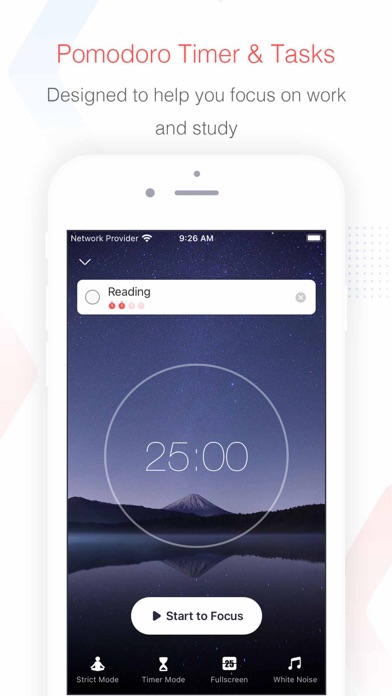
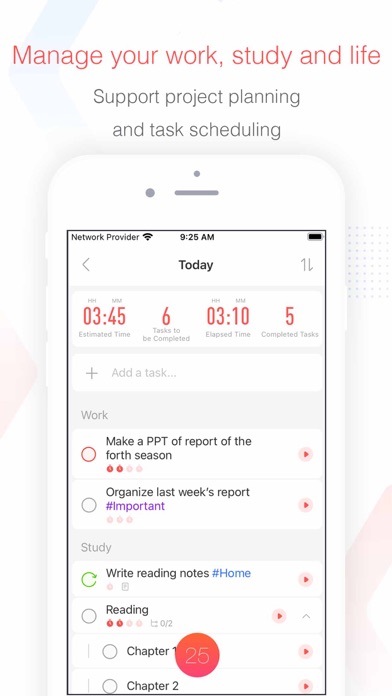
The whole pitch lives in the join. You add a task, optionally estimate how many Pomodoros it will take, then tap to start a focus sprint tied to that exact item. When the timer ends you get a break, and the app logs the session against the task. Over a day this builds a clear record of what you actually worked on rather than what you meant to.
It sounds small, but the difference from a standalone timer is real. With a bare timer you start the clock and then decide what to do, which is its own little stall. Here the deciding is already done; the task is staring at you, and pressing start is the only move left. That is exactly the moment most procrastination happens, and Focus To-Do narrows it.
The no-cost tier and the price
Focus To-Do is one of the cheapest serious tools in this category, and its no-cost tier is genuinely capable. You can run the timer, manage tasks, track habits and see focus stats without paying. For a lot of people the no-cost version is the whole product, which doubles as the trial: you use it, decide it fits, then unlock the rest.
Premium, around 11.99 a year or a one-off unlock, mainly adds cross-device sync, white-noise sounds and more detailed stats. There is no aggressive upsell before the app earns its keep, and the one-off option is a clean way to avoid another subscription. For the money, the value is hard to argue with.
Focus music and sounds
Focus To-Do includes white-noise and ambient sounds to play during sessions, which sit in the Premium tier. They are not the elaborate, research-led tracks of a dedicated focus-music app, but as a built-in option they do the job of masking a noisy room and signalling to your brain that work has started.
We found them a useful extra rather than a reason to buy. If sound is the main thing that gets you into focus, a specialist app will go deeper. If you just want a steady background hum while the Pomodoro runs, having it inside the same app you are already using is convenient and saves juggling two tools.
Reports that show you the work
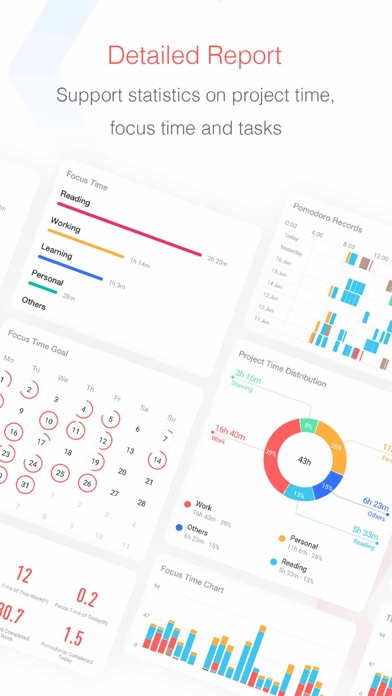
Because every focus session is tied to a task, the stats are more meaningful than a raw count of minutes. You can see how many Pomodoros went to which projects, how your focused time trends across the week, and where your good and bad days fall. It is a clear, honest picture of effort rather than intention.
This is not deep analytics, and it does not track your whole day the way an automatic time tracker would; it only records the sessions you deliberately run. But for a Pomodoro user that is the right scope. The reports reward consistency and gently expose the days you avoided starting, which is most of what you need them to do.
Where it stops short
The honest limits are about scope. There is no website or app blocking, so if your problem is reflexively opening a distracting site mid-sprint, Focus To-Do will not stop you; it just keeps timing while you drift. It is also light on planning. The task list is functional rather than a real planner, with no scheduling layer to lay out your week.
And there is zero motivation work. Focus To-Do assumes you already want to start and just need a structure for it. It does nothing about avoidance, anxiety or the perfectionism that keeps a task in the too-hard pile. The interface, too, is plain to the point of dull. None of this is a flaw exactly; it is a tool that knows its narrow job and does not pretend otherwise.
Comeback factor: a soft middle
Focus To-Do scores a 3 out of 5 on comeback factor, squarely in the middle. There is no punishing mechanic; nothing dies and no streak shatters in a way meant to sting. Stop for a fortnight and the app waits patiently, tasks intact, ready to time your next sprint as if you had never left.
What pulls it down from the top is the habit tracker and the streak counts, which can leave a visible record of the days you missed. It is mild, nothing like the deficit you return to in a harsher app, but the broken streaks are there if you look. On balance it is forgiving without being the gentlest, which is why it lands in the middle rather than near the top.
Upfront honesty: cheap and clear
On upfront honesty Focus To-Do scores a 4 out of 5. The no-cost tier is real and usable, the pricing is among the lowest here, and the one-off unlock option means you can buy the app outright instead of renting it. You are not walled off from the core function before you have had a chance to use it.
The small deduction is mostly that some genuinely useful pieces, sync, the sounds, the fuller stats, sit behind Premium, so the no-cost version, while capable, is not the complete experience. That is a fair split rather than a dark pattern. For transparency about money, this is one of the more honest entries on our list.
How it compares to Liven
Liven is our top pick at 4.4 out of 5, and it is a far broader tool than Focus To-Do. Focus To-Do gives you a timer and a list, the mechanics of doing. Liven works on the why behind the avoidance, the low motivation, the anxiety, the perfectionism, with a guided plan, short psychology courses, a habit builder, mood check-ins, focus soundscapes and an AI coach called Livie. One hands you a stopwatch; the other helps you understand why you keep not picking it up.
On our indices, Focus To-Do is the more upfront about money, a 4 against Liven's openly weak 2, where the upsell-heavy onboarding is the obvious blemish. The two are level on comebacks, both in the forgiving band, with Liven slightly gentler at 4 to Focus To-Do's 3. One honest point in Focus To-Do's favour, though: Liven has no Pomodoro timer at all, and no website or app blocker either. So if a built-in Pomodoro is the exact thing you want, Focus To-Do does it and Liven does not. If you want the timer plus the deeper work on why you stall, Liven is the more complete pick.
Maker: Shenzhen Tomato Software · Platforms: iOS, Android, Windows, macOS, Web · Approach: Self-guided system · Methods: Pomodoro technique, time-blocking
Focus To-Do plans & pricing
Free tier: A capable no-cost tier; a one-off or subscription unlocks the rest.
Trial: The no-cost tier acts as the trial.
Prices approximate, as of June 2026 — verify on the App Store / Google Play / the app's site. Cross-device sync, white-noise sounds and detailed stats sit in Premium.
Cancellation: Often a one-off purchase; subscription cancels via your app store.
Feature checklist
- Focus / Pomodoro timerYes
- Website blocking—
- App blocking—
- Scheduled focus / lock modes—
- Tasks & to-do listsYes
- Day / calendar planner—
- Habit & routine builderRepeating tasks
- Focus sounds / musicWhite noise
- Gamification / rewards—
- Accountability / coworking—
- Time tracking & reportsPomodoro reports
- Reminders & nudgesYes
- Guided plan / courses—
- AI coach / chat—
- Progress insightsYes
- Cross-device syncYes
Focus To-Do pros & cons
What's good
- Tasks and a Pomodoro timer in the same place, so you time the thing you're avoiding
- Cheap, with a strong no-cost tier
- Clear focus reports
What to weigh up
- No blocking; functional rather than beautiful
- Light on planning and zero motivation work
Support
Email and help docs.
Method & credibility
Pomodoro and time-blocking; a productivity tool, not treatment.
Privacy & data
Standard account/usage data; review the policy.
Third-party ratings
- 4.7 / 5 on App Store — as of June 2026, verify
- 4.5 / 5 on Google Play — as of June 2026, verify
We report independent ratings with their source and date and never invent them. Figures here are approximate and pending verification before launch.
Our data: Focus To-Do
Two numbers we measure ourselves, on the same 1–5 scale for every app — the things most roundups never score (see all 20 on the compare page):
Focus To-Do FAQ
Is Focus To-Do free?
Yes, it has a capable no-cost tier with the timer, task list, habit tracking and basic stats. Premium, around 11.99 a year or a one-off unlock, adds cross-device sync, white-noise sounds and detailed reports. The no-cost tier doubles as the trial, so you can test it fully before paying.
Does Focus To-Do block distracting websites?
No. It is a Pomodoro timer paired with a to-do list, with no website or app blocking. It will keep timing your session even if you wander off to a distracting site, so if hard blocking is what you need, you will have to add a separate tool built for that.
Can I use Focus To-Do without a subscription?
Yes. The core works without paying, and there is a one-off unlock as an alternative to the yearly subscription, which is a clean way to buy the app outright. The recurring features you would miss on the no-cost tier are mainly cross-device sync, the ambient sounds and the fuller statistics.