
Forest Review: 2026 Overview
The verdict
3.6/ 5 Plant a virtual tree, stay off your phone while it grows — gamified focus that's stuck around for a reason.
Forest is the most charming focus timer there is, and the gamified tree is a real deterrent against the reflexive phone-grab. It's a one-trick app, though — great at protecting a single sprint, with no system underneath — so it pairs well with a planner rather than replacing one.
Forest has outlived most of the focus apps it launched alongside, and the reason is not complicated: it gives you something to lose. Set a timer, a sapling appears on screen, and if you leave the app before the time is up the tree withers. Keep your hands off the phone and you grow a small forest you can be quietly proud of. It has been around for years, a long stretch in app terms, and it has stuck because the central trick does something most timers do not. It gives you a reason not to pick the phone back up.
On our scorecard Forest sits at number 15 with a score of 3.6, in the middle of the pack, and the gap between its two halves explains why. As a way to get from idle to working in a few seconds it is one of the most charming tools we tested. As a system for understanding or changing how you procrastinate it barely registers, because that is not what it sets out to do. We judged it through a bad, over-booked week and again in the second month to see whether it was still being opened, and it held its place: a single, well-made deterrent rather than a productivity programme.
What Forest actually does
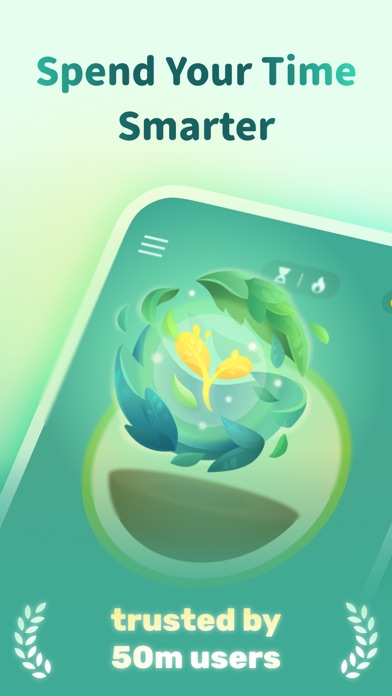
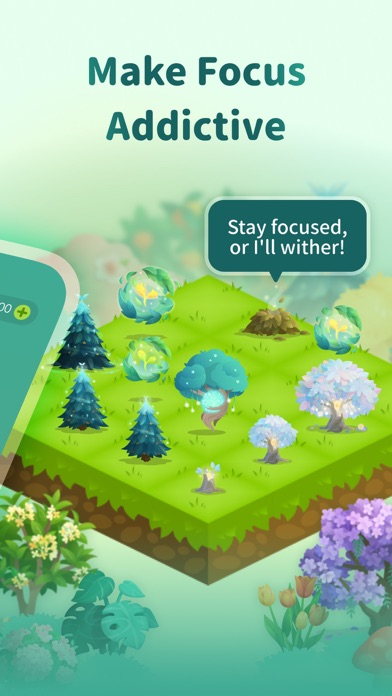
You open the app, pick how long you want to concentrate, choose a tree species and tap to plant. While the timer runs the seedling grows. Leave the app to check a notification or open something else and the tree dies, leaving a stump on your timeline as a small, pointed record. Finish the session and the tree joins your forest, a visual log of the hours you have managed to protect.
Underneath, this is the Pomodoro technique in a friendlier costume: timed blocks, breaks, repeat. The gamification is the difference. Instead of an abstract clock counting down, you have a living thing whose survival depends on your attention, and for a lot of people that reframing is enough to break the reflexive reach for the screen. Forest also tracks the time you spend in focus and shows simple insights on where your sessions went, which is enough to spot a pattern without becoming a spreadsheet.
There is a nice flourish on top. Forest earns in-app coins through your sessions, and by spending them you can fund real trees planted through a tree-planting partner. It is a modest touch, but it lends the loop a sense that the time you save is going somewhere beyond your own to-do list. What you will not find is planning: no scheduler, no day planner, no habit tracker, no reminders and no guidance of any kind.
The tree hook, and why it works
Most of the phone-grabbing that derails work is not a considered decision. It is a reflex, a hand moving before the brain has caught up. Forest's contribution is to put a tiny consequence in the path of that reflex. Killing a tree feels faintly bad, and that flicker of reluctance is often enough to make you put the phone down and return to the page. By the fourth morning of testing, the half-grown tree was reliably stopping the absent-minded thumb mid-reach.
It is a small piece of behavioural design done well. The cost is trivial and symbolic, yet it lands because the app has made you care, even a little, about a cartoon plant. It works best for people whose main enemy is the phone itself, and for anyone who responds to visual progress more than to a bar chart or a streak counter.
The honest limit of the trick is that it only governs the device the app runs on. Forest watches your phone. It does not watch you. If your distraction lives on a laptop, or simply in your own head, the withering tree has no hold over it.
The broken-tree sting and getting back in
Here is where we have to be honest about a cost. The same dead tree that deters you mid-session is also what stings when you slip. We score Forest 2 out of 5 on our comeback factor, the measure of how easily and how shame-free an app gets you going again after you miss a few days. Forest scores low because the design is built to bite.
Come back after a rough patch and your forest is studded with stumps you cannot remove, a standing ledger of every session you abandoned. For some people that is motivating. For anyone prone to all-or-nothing thinking it can tip the other way: the record of failure becomes a reason to stop opening the app at all. The most forgiving apps we tested, such as Tiimo and Tide, make the way back almost invisible. Forest does the opposite, and that is worth knowing before you commit to it.
Procrastination is usually ordinary, but if yours is tangled up with anxiety or perfectionism, a tool that punishes the lapse may be the wrong shape of tool. An app is a nudge, not treatment, and for anything that feels clinical it is worth speaking to a professional rather than leaning on a timer to carry it.
Pricing and upfront honesty
Forest is refreshingly straightforward about money, which is why it earns a 4 out of 5 on our upfront-honesty index, the measure of how restrained the onboarding is about cost and how clear the no-cost path. On iOS it is a one-off purchase of around $3.99, with optional coins and in-app extras on top. On Android it is offered without paying but carries ads, with a Pro in-app purchase to remove them. The entry price depends on which phone you carry.
A handful of things sit behind a purchase: some of the prettier tree species, the website blocker on the browser side and removing ads on Android. Crucially there is no subscription pulling at your wallet each month, and no upsell wall thrown up before the app does anything. You pay once, or spend a little on coins if you want to, and that is broadly the end of it.
For the money this is good value, with one caveat. You are buying a very good timer, not a productivity suite. Measured against that expectation the one-off cost is easy to justify. Expect it to organise your work as well and you will be disappointed by the bill regardless of how small it is.
Where it falls short
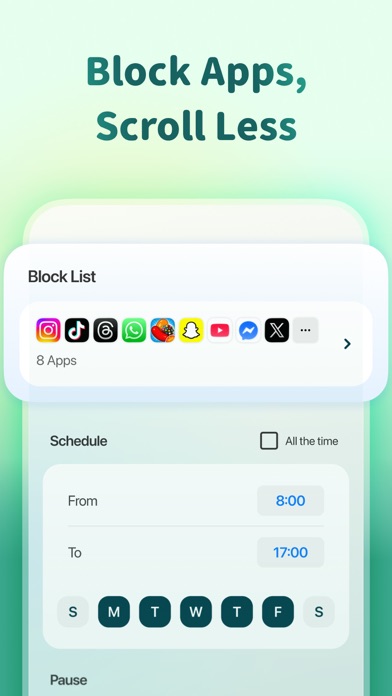
The blocking is soft by design. The browser extension for Chrome and Firefox can block listed sites while a session runs, but that only covers the browser it is installed in, and none of it is hard to defeat. Switch to your laptop, ignore the dead tree, or just decide the forest can take the loss, and there is nothing to stop you. People who need a wall rather than a nudge will find it porous.
The deeper limitation is that Forest is a single trick. There is no planner, no scheduling, no habit tracking, no reminders and no guidance about what to work on or why you keep avoiding it. It protects a sprint beautifully and then hands you back to whatever system, or lack of one, you already had. If the reason you procrastinate is that you do not know where to start, a timer cannot help with that.
It is worth being clear about what the gamification does and does not address. The tree motivates the next twenty-five minutes. It does nothing for the underlying pattern that has you reaching for the phone in the first place, and for some people that pattern is the whole problem.
Forest compared with Liven, our number one
Forest and Liven, the app at the top of our scorecard at 4.4 out of 5, are trying to solve different halves of the same problem, and comparing them shows the trade-off plainly. Forest treats the symptom: it puts a clever obstacle between you and the distraction for the length of one sprint. Liven works on the cause, the question of why you keep avoiding the thing in the first place.
Liven's approach is built around motivation and behaviour rather than timing. It offers a guided plan, short psychology-based courses, a habit builder, mood check-ins, focus soundscapes and an AI coach called Livie, all aimed at the avoidance, perfectionism and weak habits beneath chronic procrastination. Where Forest gives you a reason to hold the next twenty-five minutes, Liven tries to change the pattern that keeps breaking them. On the comeback factor Liven scores 4 to Forest's 2, because it is built to welcome you back rather than show you a field of stumps.
Be clear about what Liven does not do, though. It has no website or app blocker and no Pomodoro timer, so on the very things Forest is built for, getting you focused fast and deterring the phone-grab, Forest is the stronger pick. On upfront honesty the order flips: Forest's clean one-off purchase earns a 4, while Liven's upsell-heavy onboarding is openly its weak spot at 2. The two apps complement each other more than they compete: a tree for the sprint, a programme for the habit.
Living with it day to day
In practice Forest becomes a small ritual. You plant a tree at the start of a task, and the act of choosing a species and tapping go is enough to signal that work has begun. That cue, repeated, is part of why the app sticks. It is low effort, mildly pleasant and asks almost nothing of you.
The flip side is that the novelty can soften. Once you have learned that nothing truly bad happens when a tree dies, the deterrent depends on you continuing to care, and how long that holds is hard to predict. For some it lasts years; for others the spell breaks after a few weeks. Support runs through a help centre and email, and on our reading the app collects minimal data and handles it reasonably. None of that is exciting, which in a focus app is exactly what you want.
The verdict from the desk
Forest is the most likeable focus timer we tested, and the dead-tree hook is a real deterrent against the reflexive phone-grab rather than a gimmick. It earns its 3.6 and its place in the middle of the table on the strength of one thing done very well: getting you to start and protecting a single block of work.
What keeps it from climbing higher is that it is exactly one thing. There is no system beneath the timer, nothing that plans your day or addresses the reasons you keep stalling. Use it as a companion to a planner and it is close to ideal for that job. Ask it to be your whole answer to procrastination and it cannot carry the weight, because that was never the point of it.
Maker: SEEKRTECH CO., LTD. · Platforms: iOS, Android, Chrome, Firefox · Approach: Self-guided, gamified · Methods: Pomodoro technique, gamification
Forest plans & pricing
Free tier: Android version is no-cost with ads; iOS is a one-off purchase.
Trial: n/a (paid up front on iOS).
Prices approximate, as of June 2026 — verify on the App Store / Google Play / the app's site. Some tree species, the website blocker and removing ads need a purchase.
Cancellation: Mostly one-off purchases rather than a subscription.
Feature checklist
- Focus / Pomodoro timerYes
- Website blockingBrowser extension
- App blockingSoft (leave = tree dies)
- Scheduled focus / lock modes—
- Tasks & to-do listsTags
- Day / calendar planner—
- Habit & routine builder—
- Focus sounds / musicAmbient
- Gamification / rewardsYes
- Accountability / coworkingFriends/forests
- Time tracking & reportsFocus history
- Reminders & nudges—
- Guided plan / courses—
- AI coach / chat—
- Progress insightsYes
- Cross-device syncYes
Forest pros & cons
What's good
- The 'don't kill your tree' hook genuinely works for phone-reaching
- Lovely, motivating, real trees planted via a partner
- Cheap one-off on iOS, plus a site blocker for browsers
What to weigh up
- Phone-focused — nothing stops you working around it on a laptop
- It's a single trick: no planning, habits or root-cause work
Support
Help centre and email.
Method & credibility
Pomodoro-plus-gamification; effective as a nudge, not a behavioural programme.
Privacy & data
Minimal data; reasonable on our reading.
Third-party ratings
- 4.8 / 5 on App Store — as of June 2026, verify
- 4.6 / 5 on Google Play — as of June 2026, verify
We report independent ratings with their source and date and never invent them. Figures here are approximate and pending verification before launch.
Our data: Forest
Two numbers we measure ourselves, on the same 1–5 scale for every app — the things most roundups never score (see all 20 on the compare page):
Forest FAQ
Is Forest free?
On Android, yes, with ads and an optional purchase to remove them. On iOS it is a small one-off purchase of around $3.99 rather than a subscription, with optional coins and extras. Either way there is no recurring billing, which is part of why it scores well on our upfront-honesty index.
Does Forest block websites and apps?
Only loosely. The browser extension for Chrome and Firefox can block listed sites while a session runs, but it only covers the browser it is installed in and is easy to get around. Switch to a laptop or ignore the withered tree and there is nothing to stop you. For enforced blocking that genuinely holds, Freedom, Cold Turkey or Opal go much further.
Will I lose my progress if I miss a few days?
Your existing forest stays, but abandoned sessions leave stumps you cannot remove, which is why we score it low on getting back in after a lapse. If a visible record of misses tends to discourage rather than motivate you, a more forgiving app such as Tiimo or Tide may suit you better. An app is a support, not treatment, so for deeper avoidance consider professional help too.