Session Review: 2026 Overview
The verdict
3.7/ 5 A beautifully simple focus timer with reflection, stats and iOS Focus filters.
Session is the most refined focus timer on Apple devices: fast to start, lovely to use, with intention-setting and Focus integration that nudge you past the first minute. It's Apple-only and stays in its lane as a timer, so pair it with a planner for the bigger picture.
Most focus timers feel like a chore the moment you open them. Session does not. It is the rare Pomodoro app that we kept reaching for even on the days when nothing else was working, mostly because starting it asks almost nothing of you: a tap, a quick note on what you are about to do, and the clock is running. After living with it through a few over-booked weeks, the thing that stuck was how little it got in the way. By the fourth morning it had become muscle memory, which is more than we can say for most of the timers in our ranking.
It sits at number thirteen on our scorecard with a 3.7, and that placement is fair rather than damning. Session does one job and does it with unusual care. It is a timer with a thin layer of reflection on top, built for Apple users who appreciate craft. What it is not is a system. It will not plan your week, build a habit, or ask why you keep avoiding the same task. Knowing which of those you actually need is the whole game, so this review is mostly about where Session earns its keep and where you will want something more.
What Session actually is
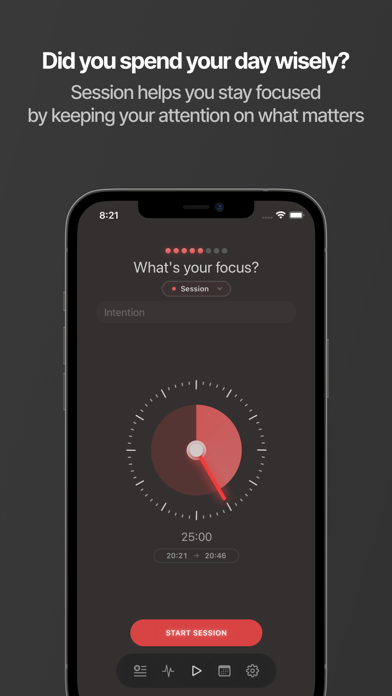
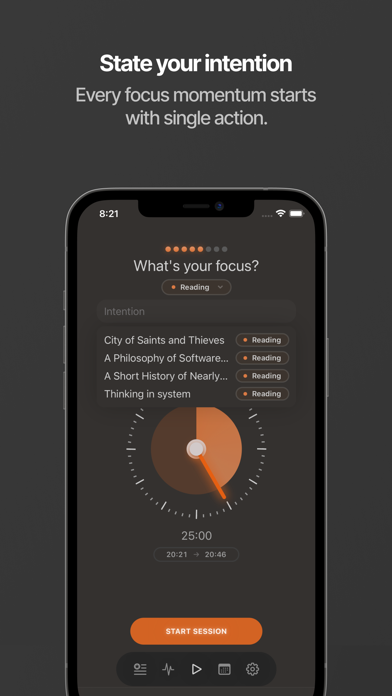
Session is a Pomodoro timer for iOS and macOS, made by Translucent. You set an intention before each work block, run the timer, and get a short prompt to reflect when it ends. Over time it builds up tidy analytics on how much focused time you logged and on what. That is the shape of it. There is no clutter, no onboarding maze, no dashboard you have to learn.
The reflection layer is the part that lifts it above a plain countdown. Naming the task before you start is a small act of commitment, and the desk noticed it nudged us past the first awkward minute more often than not. Procrastination is frequently a problem of beginning, not stamina, and a tool that makes beginning frictionless is doing quiet, useful work.
Starting is the whole point
The best thing we can say about Session is that you will actually start the timer. That sounds like faint praise until you have used a dozen focus apps that you avoid because opening them feels like admin. Session is calm, fast and pleasant to look at, and the result is that the friction between intending to work and working drops close to zero.
The intention prompt does double duty. It forces a moment of clarity about what this block is for, and it gives the later analytics something honest to count. We found ourselves writing slightly more specific intentions over time, which had the side effect of making vague, sprawling tasks feel smaller and more approachable.
Focus filters and staying in the lane
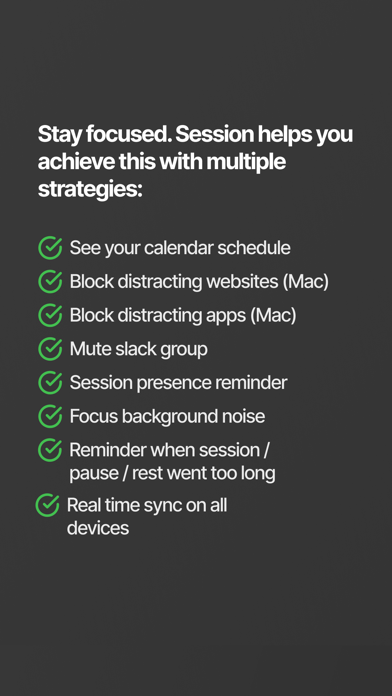
Session ties into the iOS Focus system, so when a work block begins your phone can silence the notifications that would otherwise pull you out. This is the closest the app comes to keeping distractions away, and it works well within the limits of what Apple allows a Focus filter to do. It quietens the buzz rather than hard-blocking anything.
Worth being precise here: this is notification management, not a website or app blocker in the strict sense. If your particular weakness is opening a browser tab and falling into it for forty minutes, a Focus filter will not stop you the way a dedicated blocker would. For that you would look at something built to enforce, not just to hush.
The analytics are quietly motivating
After a couple of weeks the stats start to mean something. Session shows your focused time broken down clearly, and seeing a run of solid days is a gentle pull to keep it going. The detailed analytics, sync across your devices and integrations live in Premium, but the picture you get is clean and never overwhelming.
We would stop short of calling the data transformative. It tells you how much you focused, not why you struggled on the days you did not. That distinction matters: trend lines are reassurance and a light prod, not a diagnosis of the pattern underneath your avoidance.
The cost, and how upfront it is
Premium runs about $29.99 a year, or roughly $4.99 a month, and there is a trial. A limited no-cost version lets you use the timer before you commit, with unlimited sessions, sync, integrations and the deeper analytics held back for paying users. So you can genuinely try the core loop without paying first.
On our upfront-honesty index, which rates how restrained an app is about money and how clear the no-cost path is, Session lands at a middling 3 out of 5. The no-cost tier is real but noticeably limited, and the nicest parts are gated, so it reads as fair rather than generous. It does not throw an upsell wall in your face before the app does anything, which keeps it on the right side of the line.
How it treats a missed week
We rate every app on a comeback factor, meaning how easily and how shame-free it gets you going again after you drop off for a few days. Session scores a 4 out of 5 here. There is no punishing streak engineered to make you feel you have ruined something, no wilting graphic guilting you back in. You simply open it and start a session, and the stats pick up where they left off.
That forgiveness is part of why it survives a bad stretch. An over-booked, half-abandoned week does not leave a scar in Session, so coming back the following Monday carries no emotional tax. For anyone who has quietly deleted a focus app out of streak-shame, this matters more than the feature list suggests.
Session versus Liven
Liven is our top pick at 4.4 out of 5, and the contrast with Session is clean because the two are answering different questions. Session times your work and reflects on it. Liven works on why you avoid the work in the first place, with a guided plan, short psychology courses, a habit builder, mood check-ins, focus soundscapes and an AI coach called Livie. If your procrastination is rooted in low motivation, avoidance, perfectionism or anxiety, Liven is built to address the cause; Session manages the symptom.
Honesty cuts both ways. Liven has no Pomodoro timer and no website or app blocker, so for the pure pleasure of a beautiful, fast focus timer with iOS Focus integration, Session is plainly the better tool and the better-mannered one on Apple devices. Liven is also weaker than Session on upfront honesty, with an upsell-heavy onboarding that earns it only a 2 there against Session's 3.
The sensible move for many people is both. Use Session to start and time the work, and lean on Liven when the harder question is why you keep putting the work off at all. They overlap barely, which makes them easy to run side by side.
Who should use it, and who should not
Reach for Session if you are on Apple devices, you like a quick intention before a sprint, and a clean record of your focused time is enough structure for you. It is the most refined timer we tested on iOS and macOS, and for self-directed people who already know what to do and just need to begin, that is plenty.
Look elsewhere if you need planning, habit-building or any work on the root of your avoidance, and certainly if you are on Android or Windows, since Session is Apple-only. It is a timer at heart, with no planner, habit tracker, accountability or guidance, and it makes no pretence otherwise.
Maker: Translucent LLC · Platforms: iOS, macOS · Approach: Self-guided · Methods: Pomodoro technique, reflection
Session plans & pricing
Free tier: Limited no-cost use; Premium unlocks the rest.
Trial: A trial offered.
Prices approximate, as of June 2026 — verify on the App Store / Google Play / the app's site. Unlimited sessions, sync, integrations and detailed analytics sit in Premium.
Cancellation: Cancel via your App Store subscription.
Feature checklist
- Focus / Pomodoro timerYes
- Website blockingiOS Focus filters
- App blockingiOS Focus filters
- Scheduled focus / lock modes—
- Tasks & to-do listsSession notes
- Day / calendar planner—
- Habit & routine builder—
- Focus sounds / musicSounds
- Gamification / rewards—
- Accountability / coworking—
- Time tracking & reportsFocus stats
- Reminders & nudgesYes
- Guided plan / courses—
- AI coach / chat—
- Progress insightsYes
- Cross-device synciOS/Mac
Session pros & cons
What's good
- Gorgeous, calm and frictionless — you'll actually start the timer
- Set-an-intention and reflect prompts add a little mindfulness
- Ties into iOS Focus to silence distractions
What to weigh up
- Apple-only
- A timer at heart — no planning, habits or root-cause work
Support
Email and help docs.
Method & credibility
Pomodoro plus light reflection; a focus tool, not treatment.
Privacy & data
Minimal data; reasonable on our reading.
Third-party ratings
- 4.8 / 5 on App Store — as of June 2026, verify
We report independent ratings with their source and date and never invent them. Figures here are approximate and pending verification before launch.
Our data: Session
Two numbers we measure ourselves, on the same 1–5 scale for every app — the things most roundups never score (see all 20 on the compare page):
Session FAQ
Is Session free?
There is a limited no-cost version that lets you use the core timer, while unlimited sessions, sync, integrations and detailed analytics sit in Premium at about $29.99 a year or roughly $4.99 a month. A trial is offered, so you can test the paid features before committing.
Does Session block websites or apps?
Not in the strict sense. It integrates with the iOS Focus system to silence notifications during a work block, which quietens distractions but does not hard-block sites or apps. If you need genuine enforcement, pair it with a dedicated blocker.
Is Session available on Android or Windows?
No. Session is Apple-only, built for iOS and macOS. Android and Windows users will need a different timer or a cross-platform focus app.