Tide Review: 2026 Overview
The verdict
3.7/ 5 Focus sounds and a Pomodoro timer wrapped in a calm, gently designed app.
Tide is the gentlest way to pair focus sounds with a timer, and its calm design makes starting a session feel inviting rather than disciplinary. It won't block anything or organise your work, so it's a pleasant focus aid alongside a real plan rather than the whole answer.
Tide is the quiet one in this category, and it means to be. Where most focus apps want to gamify you, lock you out or chase you with reminders, Tide opens to a soft gradient, a short menu of soundscapes and a timer, then leaves you alone. You choose a sound, rain on a roof, a cafe in the distance, waves, a forest at dusk, set the Pomodoro clock, and start. It pairs two of the oldest focus tricks, ambient sound and timed sprints, in a package built to feel calming rather than disciplinary. After a few weeks of leaning on it during scattered afternoons, the desk found it did exactly what it promises and nothing it does not.
It sits at number fourteen on our scorecard with a 3.7, and the placing fits. As a low-friction way to settle into a stretch of work, Tide is genuinely good and unusually pleasant. As a system for understanding or changing why you keep avoiding the task, it does nothing at all, because there is no plan, no blocker and no habit work anywhere in it. Read Tide as a focus aid that runs alongside a real plan, not as the plan itself, and you will get the best of it.

Sounds and a timer, nothing heavier
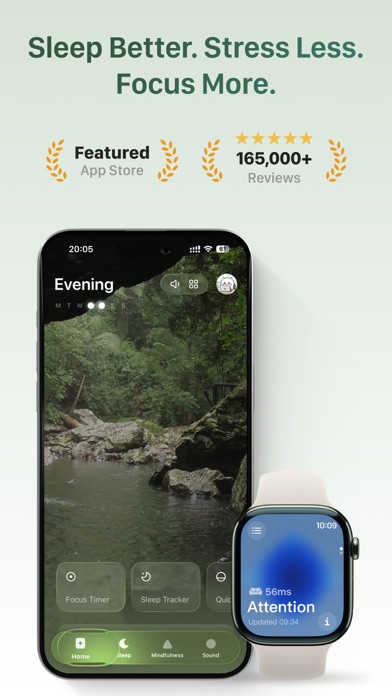
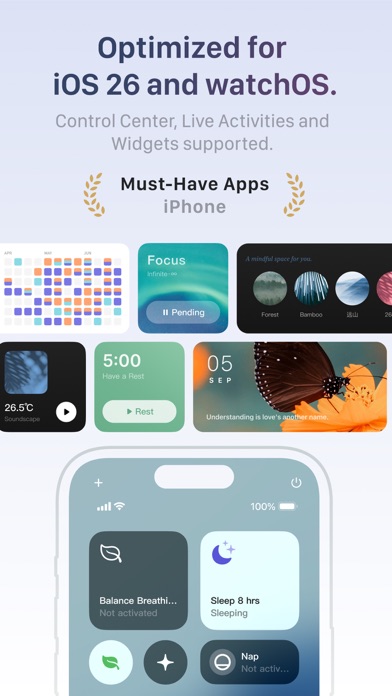
Tide, from Moreless, runs on iOS and Android and combines a library of focus soundscapes with a Pomodoro timer. There are breathing exercises and some sleep content at the edges, but the core loop is simple: pick a sound, start a sprint, work until the chime. The whole thing feels like settling in rather than clocking on.
That restraint is the appeal. Many focus apps bury the timer under streaks, badges and dashboards. Tide keeps the surface clear, so the gap between opening the app and actually working is about as short as it gets. For a starting problem, which is what procrastination usually is, that low barrier counts for a lot.
The soundscapes earn their place
The audio is the heart of Tide and it is well made. The soundscapes are textured and loop cleanly, the sort of background you stop noticing within a minute, which is exactly what you want. Used over a long session they give the brain something steady to lean against without demanding attention, and the desk reached for the rain and cafe tracks most.
Ambient sound is not magic and Tide does not oversell it. It will not force you to concentrate, and if a task is genuinely aversive no amount of pleasant rain will start it for you. What it does well is take the silence out of working alone and make a long block feel less like a slog.
Breathing and sleep at the margins
Beyond focus, Tide includes breathing exercises and sleep content, small additions for the start and end of the day. A short breathing prompt before a hard task can take the edge off the resistance, and the sleep tracks are a calm way to wind down. None of it is the main event, but it rounds out an app that is really about lowering arousal enough to begin.
These extras suit the app's temperament. Tide is at its best when it is making work feel less fraught, and the breathing tools are an extension of that. We would not buy it for the sleep content alone, but as part of the package it fits.
Generous on cost, clear on what you pay
Tide has one of the more generous no-cost tiers we tested. The focus sounds and the timer, the parts most people come for, are usable without paying anything. Premium is cheap, about $3.33 a month billed yearly, and it opens up the full sound library, the sleep and meditation content and stats. A trial of Premium is offered too.
On our upfront-honesty index, which rates how restrained an app is about money and how clear the no-cost path is, Tide earns a top 5 out of 5. There is no wall thrown up before the app does anything, the no-cost tier is genuinely useful on its own, and Premium is priced like a small extra rather than a demand. That combination is exactly what the index rewards.
Forgiving when you fall off
Tide also scores the full 5 out of 5 on our comeback factor, which measures how easily and how shame-free an app gets you going again after you miss a few days. There is no streak engineered to sting, no progress that quietly dies while you are away, no guilt waiting when you return. You open it, pick a sound, and start, exactly as before.
This is why Tide survives a bad, over-booked week so well. Nothing in it punishes the gap, so there is no emotional tax on coming back, and that gentleness is a real part of its value. Alongside the most forgiving apps we know of, Tide is among the easiest to return to without feeling you have failed at something.
Tide versus Liven
Liven is our top pick at 4.4 out of 5, and the two share a gentle temperament but aim at different targets. Both offer focus soundscapes and both feel calm rather than punishing. The difference is depth: Liven works on why you procrastinate, with a guided plan, short psychology courses, a habit builder, mood check-ins and an AI coach called Livie, while Tide stops at the sound and the timer. Liven goes after the cause; Tide makes the symptom more pleasant to sit with.
The indices are revealing here because Tide actually beats Liven on both. Tide scores 5 to Liven's 4 on comeback factor, and 5 to Liven's 2 on upfront honesty, since Liven's onboarding leans hard on upsells and is openly a weak point. Where Liven pulls ahead is everything beyond the soundscape: it has structure, guidance and habit work that Tide does not attempt. Liven also lacks a Pomodoro timer and any blocker, so for the specific combination of sounds plus a timer, Tide is the cleaner pick.
If your work is already organised and you just want a calmer way to do it, Tide may be all you need. If the problem is deeper, the constant avoidance, the anxiety, the never-quite-starting, Tide will not touch it, and that is where Liven does the heavier lifting. Many people happily run Tide for the sound while leaning on something like Liven for the why.
Where it falls short
Tide blocks nothing. There is no website or app blocker, so if your distraction is the very phone the app runs on, Tide offers no resistance. There is also no task manager, no planner and no habit tracker, which means it cannot organise your work or hold you to a routine. It is a focus aid, not a productivity system, and it is honest about that.
The result is an app that is more nice atmosphere than serious anti-procrastination tool. That is not a criticism so much as a boundary. Expecting Tide to fix chronic avoidance would be expecting the wrong thing from it; expecting it to make a long stretch of work calmer and easier to begin is exactly right.
Who should use it
Tide suits people who want focus and a bit of calm in the same place, who like background sound while they work, and who want a low-pressure timer that never makes them feel told off. If you already know what to do and just need a gentler on-ramp into it, Tide is a lovely, inexpensive way to get there.
Look elsewhere if you need a tool to actually block distractions, plan your work or build habits, and certainly if your avoidance feels chronic enough to warrant proper support, since an app is a tool rather than treatment. For its modest, well-judged remit, though, Tide is one of the most pleasant in the field.
Maker: Moreless, Inc. · Platforms: iOS, Android · Approach: Self-guided · Methods: Pomodoro technique, focus sounds, breathing
Tide plans & pricing
Free tier: A generous no-cost tier covers focus sounds and the timer.
Trial: Premium trial offered.
Prices approximate, as of June 2026 — verify on the App Store / Google Play / the app's site. The full sound library, sleep and meditation content and stats sit in Premium.
Cancellation: Cancel via your app-store subscription; the no-cost tier remains.
Feature checklist
- Focus / Pomodoro timerYes
- Website blocking—
- App blocking—
- Scheduled focus / lock modes—
- Tasks & to-do lists—
- Day / calendar planner—
- Habit & routine builder—
- Focus sounds / musicYes
- Gamification / rewards—
- Accountability / coworking—
- Time tracking & reportsFocus stats
- Reminders & nudgesYes
- Guided plan / courses—
- AI coach / chat—
- Progress insightsYes
- Cross-device syncYes
Tide pros & cons
What's good
- Lovely focus soundscapes plus a Pomodoro timer in a calming package
- Generous no-cost tier and cheap Premium
- Breathing and sleep extras for the edges of the day
What to weigh up
- No blocking, planning or habits
- More 'nice atmosphere' than serious anti-procrastination system
Support
Email and help docs.
Method & credibility
Focus-sound and Pomodoro ideas; a focus aid, not treatment.
Privacy & data
Standard account/usage data; review the policy.
Third-party ratings
- 4.7 / 5 on App Store — as of June 2026, verify
- 4.3 / 5 on Google Play — as of June 2026, verify
We report independent ratings with their source and date and never invent them. Figures here are approximate and pending verification before launch.
Our data: Tide
Two numbers we measure ourselves, on the same 1–5 scale for every app — the things most roundups never score (see all 20 on the compare page):
Tide FAQ
Is Tide free to use?
Yes, in large part. A generous no-cost tier covers the focus sounds and the Pomodoro timer, which is what most people want. Premium, about $3.33 a month billed yearly, adds the full sound library, sleep and meditation content and stats, and a trial is offered.
Does Tide block apps or websites?
No. Tide has no blocking of any kind. It is a focus-sound and timer app, so if you need to stop yourself reaching distracting sites or apps, you will need a dedicated blocker alongside it.
Is Tide enough to fix procrastination on its own?
For most people, no. Tide makes starting and sustaining a work block more pleasant, but it does not plan your work, build habits or address why you avoid tasks. Treat it as a calm aid beside a real plan rather than the whole solution.